
What a Weekly Review Actually Is
A weekly review isn’t a status report. It’s a structured pause where you look back at what happened, decide what it means, and choose what to focus on next. The goal is to walk into Monday with three clear priorities instead of a fog of leftover tasks. The concept comes from David Allen’s Getting Things Done, but the version I use is closer to Michael Hyatt’s Full Focus Planner system. The key difference: it’s not just about clearing your inbox. It’s about connecting your daily work to your quarterly goals and making sure you’re spending time on what actually matters.My Weekly Review Structure
Every Monday morning, I sit down with my printed planner and work through this: 1. Review what I committed to last week. I look at my Prior Week Big Three — the three priorities I set seven days ago. Did I finish them? Did they even matter by Wednesday? This takes two minutes and it’s the most honest part of the review. 2. Run through the checklist. I check my deferred tasks, review my notes from the week, fill out my calendar for the upcoming week, scan my to-do list for anything stale, and identify anything I should delegate. This prevents things from falling through the cracks. 3. Start / Stop / Keep. One thing to start doing, one to stop, one to keep. Simple framework, but it forces me to actually adjust my behavior instead of just grinding through the same patterns. 4. Write down my Big Wins. Five things that went well. This is easy to skip and important not to. Productivity systems are great at showing you what’s undone. The Big Wins section is the counterbalance. 5. Track my habits. I track three habits per week with daily checkboxes. Nothing complicated — just consistency data. After a few weeks, the patterns become obvious. 6. Pick my new Big Three. These are my top three priorities for the upcoming week. Not tasks — outcomes. “Finish the Q2 proposal” not “work on proposal.” The Big Three sit at the top of every daily page so they’re always visible. The whole process takes about 20 minutes. Some weeks it’s 15. The weeks where it takes 30 are usually the weeks I needed it most.Why It Works
The weekly review works because it forces a decision. Without it, you start Monday reacting to whatever’s loudest. With it, you start Monday knowing the three things that matter most. It also gives you a longitudinal view. After a quarter of weekly reviews, you can flip through and see patterns — which weeks were proactive, which were reactive, where you stalled on goals. That kind of self-awareness is hard to get from an app, but it’s obvious when you’re looking at 13 weeks of handwritten notes.Get the Free Weekly Review Template
I’ve made my weekly review template available as a free printable PDF. It includes everything I described above — the review checklist, Prior Week Big Three, Start/Stop/Keep, Big Wins, habit tracker, and New Big Three — all on one page.Get the Free Planner Templates
Enter your email to download the blank daily planner and weekly review templates. You'll also get notified when new quarterly planners drop.
No spam. Unsubscribe anytime.
What If You Want This Automated?
I run this review on paper every Monday. But I also built Goalzz.me to do it digitally with AI coaching. Goalzz connects to Microsoft To Do, pulls in my actual tasks and goals, and runs a structured review where the AI coach asks me how the week felt before showing me the data. It connects my feelings to what actually happened and helps me pick better priorities for next week. The paper version is where I do the thinking. Goalzz is where the data lives. Both work on their own, and they work better together.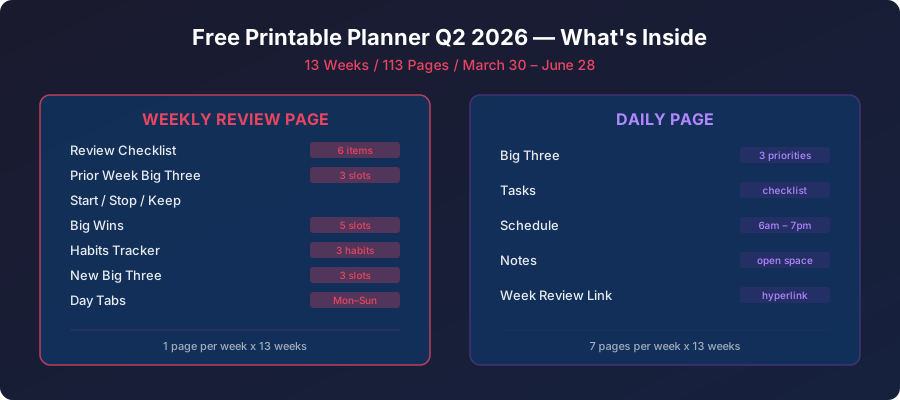
More Free Planner Resources
- Free Printable Planner for Q2 2026 — Weekly reviews, daily pages, and Big Three for April-June 2026
- Free Digital Planner PDFs for reMarkable 2 — Daily and weekly review templates
- Full Focus Planner on reMarkable 2 — The original digital Full Focus system
- Digital Planner PDF with Hyperlinks — Pre-filled dates and clickable navigation
- How a Planner Review Checklist Enhances Weekly Productivity