
I made a free printable planner for Q2 2026 and you can download it at the bottom of this post. If you’ve been following along with how I use the Full Focus Planner methodology, you know the start of a new quarter is the time to reset. New quarter, fresh goals, clean pages. This one covers the entire second quarter — April through June — with weekly reviews and daily pages for all 13 weeks.
Why I Still Use a Free Printable Planner
I know there are a thousand apps for this. I built one of them. But there’s something about a printed planner that works differently for me. When I sit down on Monday morning and physically write my Big Three priorities for the week, they stick in a way that typing them into a text field doesn’t. The act of writing slows me down just enough to actually think about what matters.
I use digital tools for tracking, syncing, and coaching — that’s what Goalzz is for. But the printed planner is where I do the thinking. It’s where I decide what my week is actually about before the noise starts.
What’s in This Free Printable Planner
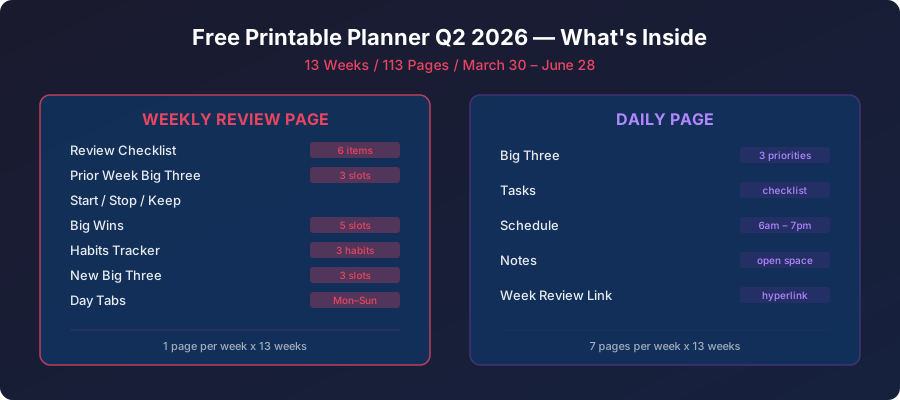
This Q2 planner covers March 30 through June 28, 2026 — 13 full weeks. Every week follows the same structure:
Weekly Review Page — This is the anchor of the whole system. Each weekly review page includes:
- A review checklist (deferred tasks, notes, calendar, to-do list, delegation, and breaking down your Big 3)
- Prior Week Big Three — so you can see how last week’s priorities actually landed
- Start / Stop / Keep — a simple framework for adjusting your approach week over week
- Big Wins — space to write down five things that went well, because it’s easy to forget those
- Habits tracker — three habits with daily checkboxes for the full week
- New Big Three — your top three priorities for the upcoming week
- Linked day tabs (Monday through Sunday) so you can flip between the review and any day quickly
Daily Pages — Every day of the quarter gets its own page with:
- Big Three — your three most important tasks for the day, pulled from your weekly Big Three
- Tasks — a general task list with checkboxes for everything else on your plate
- Schedule — an hourly time-block grid from 6 AM to 7 PM
- Notes — open space at the bottom for meeting notes, ideas, or whatever comes up
- A link back to the Week Review page so you can always re-anchor to your weekly priorities
How I Use It
I print the whole thing double-sided, punch it for a binder, and keep it on my desk. Monday mornings start with the weekly review page. I check off what I reviewed, write my Big Wins from last week, update my habit tracker, and then pick my new Big Three. That process takes about 20 minutes and it’s the most valuable 20 minutes of my week.
During the day, I reference the daily page to stay focused. The Big Three sit at the top so they’re always visible. The schedule grid helps me time-block — I’m not great at this yet, but even a rough plan beats no plan. And the notes section catches all the random things that come up so they don’t live in my head.
At the end of the quarter, I can flip through 13 weeks of reviews and see patterns. Which weeks were proactive? Which ones were reactive? Where did I stall on goals? That kind of longitudinal view is hard to get from an app, but it’s obvious when you’re flipping through physical pages.
Download the Free Printable Planner
The PDF is 113 pages — one weekly review and seven daily pages per week, for 13 weeks. Print it, bind it however you like, and use it however works for you. No email signup, no paywall. Just the planner.
Download the Q2 2026 Planner (PDF)
If you want the digital side of this — AI coaching, automated weekly reviews, habit tracking, and proactive nudges built on top of this same methodology — check out goalzz.me. But the paper planner stands on its own. Sometimes the simplest tool is the one you actually use.